Spot a Fake Profile: A Guide to Reverse Image Search

By Sandra · Updated on 9 September 2026 · ✓ Reviewed by the editorial team

Spot a Fake Profile: A Guide to Reverse Image Search

A reverse image search uncovers stolen profile pictures and romance scams in seconds. You'll find out instantly if your match's photo is already circulating on other platforms – or if it belongs to a real person.

The essentials at a glance

You can spot fake profiles with a reverse image search to uncover stolen photos. Free tools like Google Lens or Yandex show you straight away if the pictures come from other websites or social media profiles.

  • A reverse image search exposes stolen photos before you get emotionally invested or lose money.
  • Google Lens, Yandex and TinEye are free tools that have different strengths – Yandex is particularly good with faces.
  • The search also works on your smartphone: with the Google Lens app or the "Request Desktop Site" browser trick.
  • AI-generated images are harder to spot – pay attention to details like asymmetrical earrings, blurry backgrounds or skin that's too smooth.
  • If you confirm a profile is fake: cut off contact immediately, report the profile and save any evidence.

Table of Contents

  1. Why use a reverse image search? The romance scam check
  2. Red flags: Warning signs to look for first
  3. Step-by-step: How to do a reverse image search on a desktop
  4. Mobile guide: How to do a reverse search on your smartphone
  5. The best tools for searching for people
  6. New challenge: Spotting AI-generated fake profiles
  7. What to do if the profile is a fake
  8. FAQ: Frequently asked questions

Check right now with our free safety tool

1. Why use a reverse image search? The romance scam check

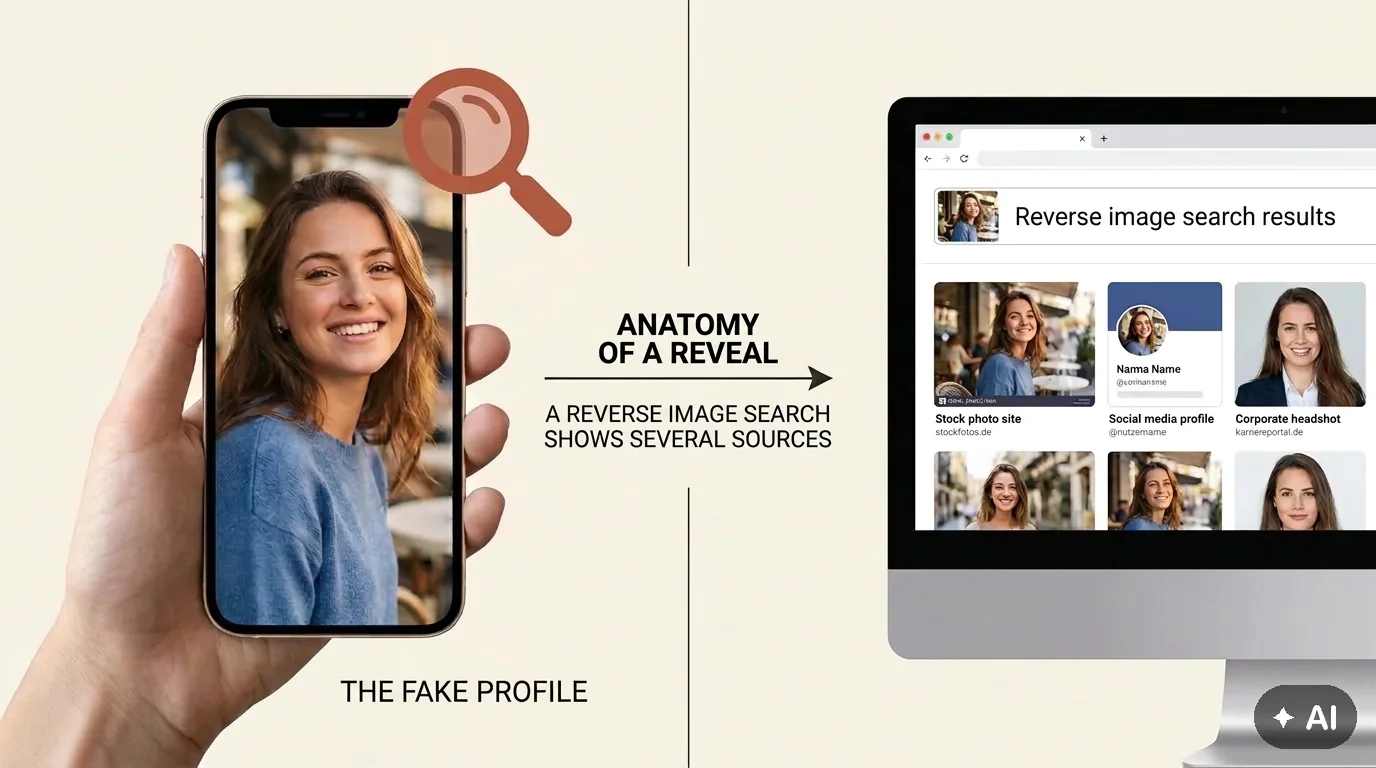
Scammers often use photos of models, influencers or strangers' social media profiles to build trust. A reverse image search identifies stolen photos before you get emotionally involved or take any financial risks.

A profile picture that looks too perfect on dating sites like eharmony, Ourtime or Match.com is worth checking. You should also be careful on Tinder, Bumble or Instagram. A profile picture reverse search acts as your first line of defence against romance scams – it shows you in seconds if the photo is already circulating online under a different name.

Why is this so important right now? Romance scammers are constantly professionalising their methods. While they used to use obviously stolen stock photos, scammers today rely on more subtle tactics: several consistent pictures of the same person, AI-generated faces or photos from less well-known social media profiles. A reverse image search remains your most reliable tool for uncovering these deceptions.

The goal is clear: validate your gut feeling and gain peace of mind before you invest time and emotions.


2. Red flags: Warning signs to look for first

Certain patterns point to a fake profile even before you start a reverse image search. These warning signs will help you identify suspicious profiles quickly.

The look: Too good to be true?

Professional photos with perfect lighting, flawless make-up or a stock photo aesthetic are an initial red flag. Real people have candid snapshots too – not just perfectly staged portraits.

It's a giveaway if all the pictures show the same pose or facial expression. Or if the person is wearing identical make-up and has the same hairstyle in every photo, as if they were all taken on the same day. A good rule of thumb is that at least one photo should be "imperfect" – a selfie with bad lighting, a group picture, a candid everyday shot.

Profile check: Few followers, no premium membership

A new profile with only 3-4 perfect pictures, few followers and vague job details (e.g., "engineer abroad", "in the military") is suspicious. Scammers often rely on generic backstories to explain why they can't do video calls.

Other warning signs:

  • Pushes to move to WhatsApp or Telegram quickly
  • Never wants to video call ("camera's broken", "bad internet connection")
  • Love-bombing: "You're my soulmate" after two days
  • Their time zone doesn't match their claimed location
  • The profile was only created a few days ago
  • The bio has spelling mistakes or looks like it's been machine-translated
  • No links to other social media profiles

Scammers avoid platforms that require verification. The proportion of fake profiles is much higher on dating apps that don't have ID or photo verification.


3. Step-by-step: How to do a reverse image search on a desktop

The desktop version of the reverse image search offers the most comprehensive options and delivers the most accurate results. Here's how to do it:

Google Images: Upload vs. URL

Go to Google Images and click the camera icon on the right of the search bar. You have two options:

Option 1: Upload an image

  • Take a screenshot of the profile picture (on Windows: Windows key + Shift + S, on Mac: Cmd + Shift + 4)
  • Click on "Upload a file"
  • Select the screenshot
  • Google will show you all the websites where this image appears

Option 2: Paste an image URL

  • Right-click on the profile picture
  • Select "Copy image address" (or "Copy Image Location")
  • Paste the URL into the search field
  • Start the search

Google will show you where else the photo appears. If it's on stock photo sites, in model portfolios or used under a different name, you have a clear sign of a fake profile.

What to look for in the results:

  • Does the image appear on stock photo platforms like Shutterstock, Getty Images or Unsplash?
  • Is it being used with different names?
  • Does it show up in articles about romance scams or fake profiles?
  • Is there an older version of the image with a different context?

TinEye: Searching for the "original"

TinEye searches the web for the oldest version of an image. This helps you find out if the photo was used on another profile years ago – a classic sign of stolen profile pictures.

How to use TinEye effectively:

  1. Upload the profile picture to TinEye
  2. Sort the results by "Oldest"
  3. Check when and where the image first appeared
  4. Compare that date with the date the dating profile was created

It's a good idea to use both tools at the same time. Google finds more matches and covers a wider spectrum, while TinEye shows you the chronological history and helps identify the original source.

Pro tip: If TinEye shows that the image appeared on a Russian social media profile years ago, but the dating profile was only created last week – that's a clear case of identity theft.


4. Mobile guide: How to do a reverse search on your smartphone

The reverse image search also works when you're on the go. Two methods have proven effective:

Using the Google Lens app

Download the Google Lens app (iOS & Android). The app is free and ready to use in seconds.

Step-by-step guide:

  1. Open the Google Lens app
  2. Take a screenshot of the profile picture (on iOS: side button + volume up, on Android: power + volume down)
  3. In Lens, tap the gallery icon
  4. Select the screenshot
  5. Lens will instantly show you similar images from around the web

The app analyses the image in real time and delivers results in 3-5 seconds – it's the fastest way to do a reverse image search on the move.

Extra feature: Google Lens also recognises text in images. If the profile picture has a watermark or a photographer's credit, Lens will extract it automatically – another clue that the image has been stolen.

Flat lay of a smartphone showing instructions for a mobile reverse image search and how to activate the desktop view.

The mobile search often requires a little trick: use the 'Request Desktop Site' function in your browser to unlock all the upload options on your smartphone.

The browser trick: "Request Desktop Site"

If you don't want to install the Google Lens app, the search also works directly in your browser.

Instructions for Safari (iOS):

  1. Open Google Images in Safari
  2. Tap the "aA" icon on the left of the address bar
  3. Select "Request Desktop Site"
  4. The camera icon will now appear in the search bar
  5. Tap it and upload the screenshot

Instructions for Chrome (Android):

  1. Open Google Images in Chrome
  2. Tap the three dots (menu) in the top right
  3. Enable "Desktop site"
  4. Camera icon → Upload image
  5. Check the results

The browser trick is a bit more fiddly than the app, but it works just as reliably. The advantage is you don't have to install an extra app.


5. The best tools for searching for people

Not every tool gives you the same results. Choosing the right one depends on what you're looking for – and how deep you want to dig.

A comparison of the main search engines

Tool overview: Strengths and weaknesses

Tool Strength Cost Special feature
Google Lens All-rounder, fast Free Integrated into Android
Yandex Images Facial recognition Free Often finds more than Google
TinEye Chronological history Free Shows the oldest version
PimEyes Professional face search Basic search free, details paid Saves search queries
Social Catfish Dating scam specialist Paid Combines image + name + email

Google Lens: The all-rounder

Google Lens is fast, free and integrated into Android devices. The results cover a wide spectrum – from stock photo databases to social media and news sites. Ideal for a first check with a reverse image search.

Strengths: Largest database, fastest results, easy to use
Weaknesses: Doesn't always find all social media profiles, especially if they're private

Yandex Images: Surprisingly good at facial recognition

Yandex is a Russian search engine that is particularly precise when it comes to facial recognition. Upload the image – Yandex often finds matches that Google misses. Perfect for a reverse image search for dating.

Yandex also searches Russian and Eastern European social media platforms like VKontakte (VK), which Google often doesn't index. Since many romance scammers operate from Eastern Europe, Yandex frequently provides the crucial hits here.

Strengths: Excellent facial recognition, searches VK and other Eastern European platforms
Weaknesses: Interface is in English/Russian, data privacy concerns with a Russian provider

Real-world example: Google finds nothing, but Yandex shows you the same face on a VK profile under a different name – clear proof of identity theft.

PimEyes: The professional tool (with a privacy note)

PimEyes searches the web specifically for faces. The technology is based on facial recognition and also finds images where the person is only in the background or in a different pose.

How it works:

  1. Upload a photo
  2. PimEyes scans the face
  3. The basic search shows you how many websites the face appears on (free)
  4. For the details (which exact websites), you pay from around £25/month

Important: PimEyes saves your search queries and creates a profile of your searches. Use it with caution and only if Google and Yandex don't provide any results.

Strengths: Also finds images with a different angle or lighting
Weaknesses: Paid for details, data privacy concerns, saves search queries

Social Catfish: Specialises in dating fraud

Social Catfish combines an image search with a name, email and phone number. The tool has been developed specifically to uncover dating fraud.

What it can do:

  • Reverse image search
  • Email search (finds profiles registered with that email)
  • Phone number search
  • Name search that checks against scammer databases

It's a paid service (from around $25/month), but it's helpful in persistent cases where you're already in deeper contact and have several data points.

Strengths: Combines multiple search types, access to scammer databases
Weaknesses: Paid service, primarily focused on US databases

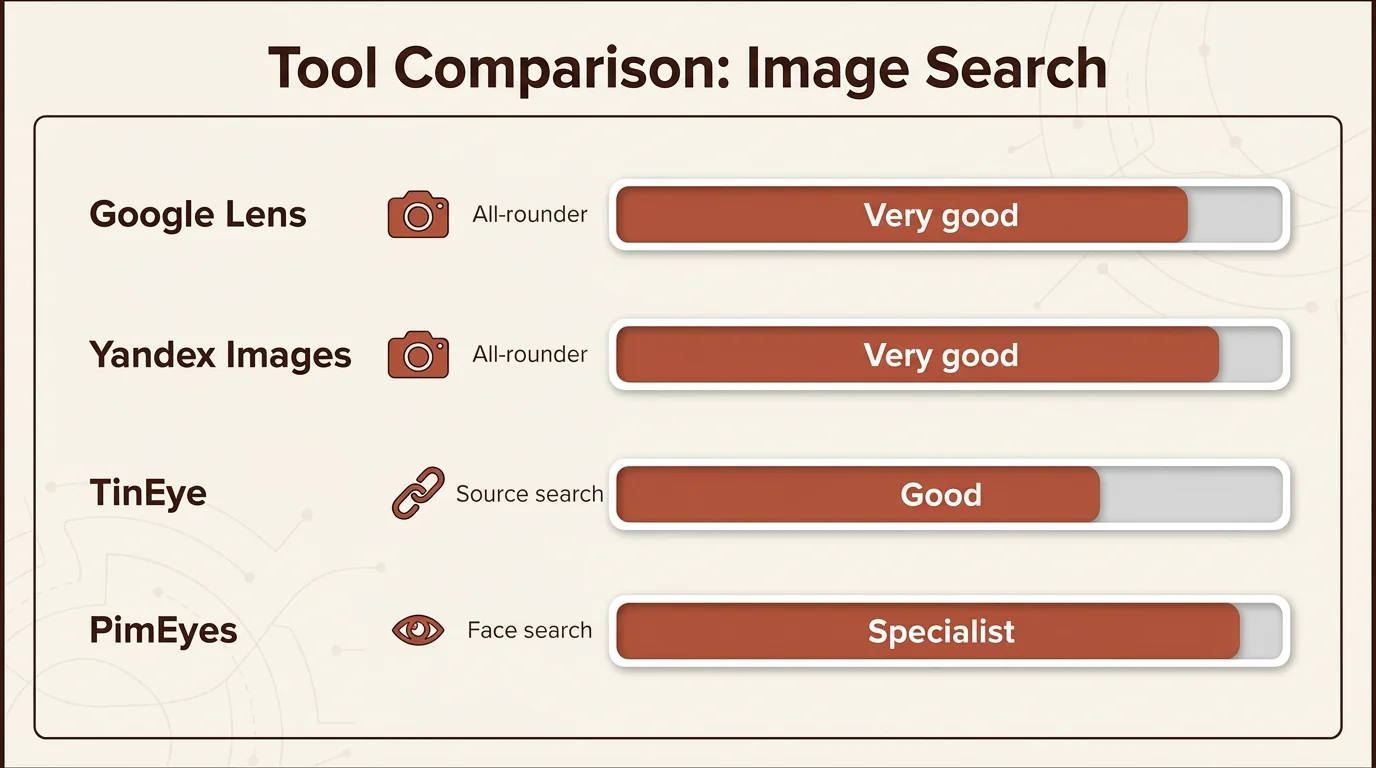
Comparison table of the best tools for reverse image searching, including Google Lens, Yandex and PimEyes, with an effectiveness rating.

Not every tool is suitable for every purpose. While Google Lens is a strong all-rounder, Yandex often offers more precise facial recognition for social networks.

Recommended strategy:

  1. Start with Google Lens (free, fast)
  2. If there are no hits, use Yandex (free, often finds more)
  3. If there's still nothing, use TinEye for the chronological history (free)
  4. Only if you have a well-founded suspicion and no hits: PimEyes or Social Catfish (paid)

6. New challenge: Spotting AI-generated fake profiles

AI-generated images are the latest scamming method. A reverse image search won't work here because the photos are newly invented and don't exist anywhere else on the web. You need to look for other tell-tale signs.

Scammers are increasingly using AI tools like Midjourney, Stable Diffusion or DALL-E to generate deceptively realistic faces. These images won't show up in any database – they were never photographed, but created by an AI.

Tell-tale AI characteristics

Asymmetrical details:

  • Earrings: One ear has an earring, the other doesn't – or the two earrings look different
  • Glasses: One arm of the glasses is thicker than the other, or the lenses are different shapes
  • Eyes: Slightly different sizes or shapes, the patterns in the irises aren't identical

Background anomalies:

  • Blurry structures: The background seems out of focus, but not because of depth of field – it's more like it's "dissolving", with objects merging into one another
  • Nonsensical text: Signs, books or posters in the background show letters that don't make sense
  • Impossible architecture: Windows that aren't symmetrical, door frames that are bent

Skin and hair:

  • Skin that's too smooth: No pores, no natural blemishes, no freckles or moles
  • Hair merging with the background: Blurry transitions, individual strands of hair "dissolving"
  • Perfect symmetry: Real faces are never perfectly symmetrical – AI faces often are

Hands – the classic AI mistake:

  • Wrong number of fingers: Six fingers, four fingers, or fingers that merge into each other
  • Unnatural positions: A thumb on the wrong side, joints that bend the wrong way
  • Blurry hands: AI often "hides" hands behind objects or makes them blurry because it has trouble rendering them correctly

Photo consistency:

  • Every photo is a polished portrait: No candid snapshots, no group pictures, no everyday situations
  • Identical lighting: All the pictures look as if they were taken in the same studio
  • No metadata: Real smartphone photos contain EXIF data (camera model, date, GPS). AI images don't have this.

The live test: The ultimate verification

Ask for a spontaneous photo with a piece of paper showing today's date and a word of your choice. An AI can't deliver that in seconds – a real person can.

How to phrase the request:
"Hey, I've become a bit cautious with online dating. Could you send me a quick selfie holding a piece of paper with 'Hello [your name] + today's date' on it? Happy to do the same for you!"

What happens next:

  • A real person: Sends you the photo within 1-2 minutes, maybe with a smile or a comment like, "Sure, here you go!"
  • A scammer: Makes excuses ("camera's broken", "I'm out at the moment", "Why don't you trust me?"), gets defensive or breaks off contact.

Choose an unusual word (e.g., "pineapple", "Thursday", "rainbow") so the scammer can't just send a pre-prepared picture with a generic message.

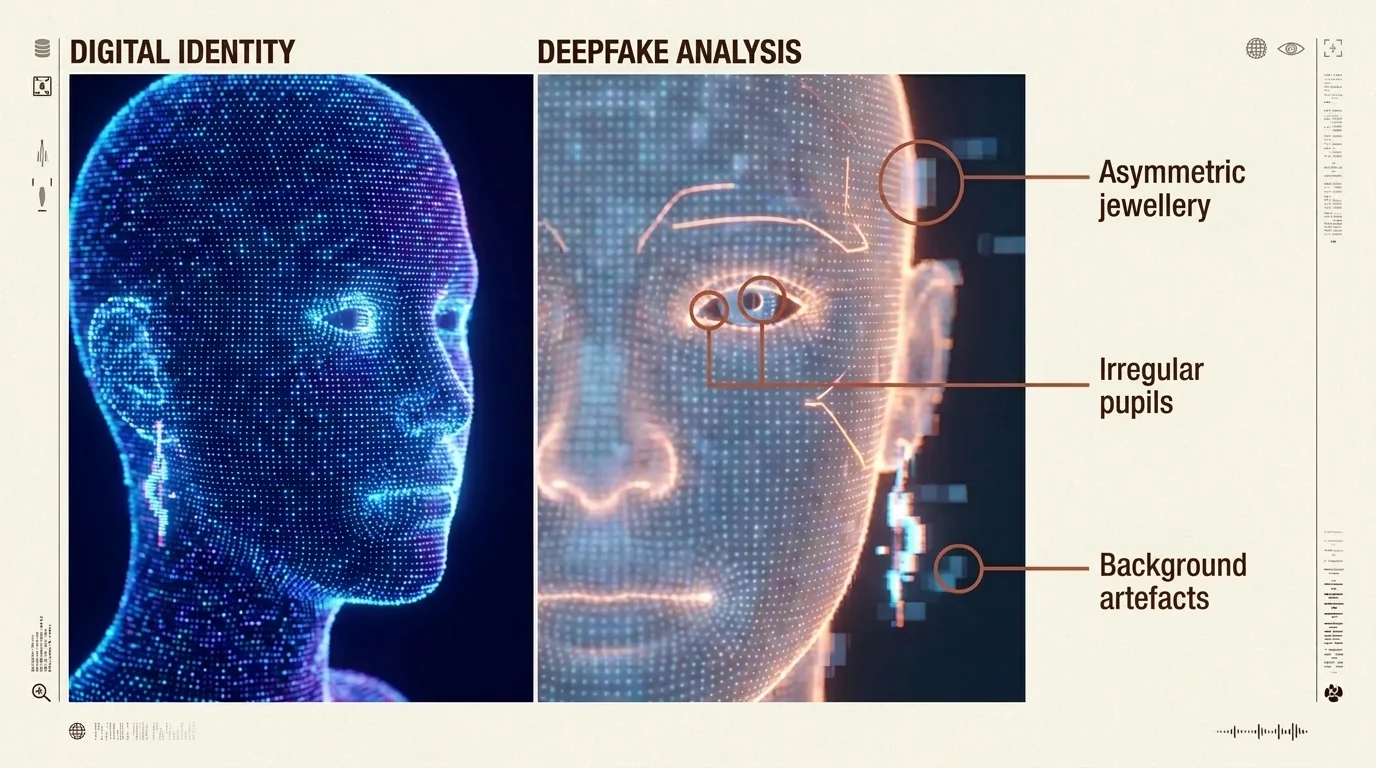
Infographic on how to spot AI-generated fake profiles, with tips on looking for asymmetrical features and background errors.

AI-generated images often have subtle flaws. Look for asymmetries in earrings or unnatural structures in the background to reliably spot deepfakes.

Extra tip: There are also AI detectors like Hive Moderation or Illuminarty that analyse images and give a probability of them being AI-generated. However, these tools aren't 100% reliable – the live test remains the safest method.


7. What to do if the profile is a fake

You've unmasked a fake profile. Now you need to act quickly and systematically to protect yourself and warn others.

Cut off contact immediately

Don't argue with the scammer. End all communication immediately – no explanations, no confrontation, no "Why are you doing this?" questions.

Why no confrontation?

  • Scammers are professional manipulators. They will try to convince you that you're wrong.
  • You're giving them information about how you unmasked them – they'll just adapt their methods.
  • It costs you emotional energy that you're better off investing in genuine connections.

What to do instead:

  • Block the person on all channels (dating app, WhatsApp, Instagram, etc.)
  • DO NOT delete the chat history straight away – you'll need it as evidence
  • Don't reply to any more messages, not even a "Please let me explain"

Report the profile

Use the report function on the dating apps or social networks. This is how you protect other singles from the fake profile.

How to report correctly:

Tinder:

  1. Open the profile
  2. Tap the red shield icon
  3. Select "Fake Profile" or "Scam"
  4. Add screenshots as proof (if possible)

Bumble:

  1. Open the chat
  2. Tap the three dots in the top right
  3. Select "Block & Report"
  4. Reason: "Fake profile or scam"

Instagram:

  1. Open the profile
  2. Tap the three dots in the top right
  3. Select "Report"
  4. Reason: "Fake account"

eharmony, Match.com, Ourtime:

  • Use the "Report Profile" function in the app
  • Also contact customer service by email with screenshots

The more people who report a profile, the faster it will be deleted. Your report could stop others from becoming victims.

Get support

If you're not sure if the profile is really a fake, or if you need emotional support:

Upload the chat or profile to Alva. The AI scam check analyses warning signs in seconds and gives you a clear assessment – without saving any screenshots.

What Alva checks:

  • Language and phrasing (typical scammer phrases)
  • Timing patterns (escalating too quickly, love-bombing)
  • Inconsistencies in their story
  • Typical scam tactics (requests for money, emergencies abroad)

Alternatively, talk to friends or family. People on the outside can often see red flags more clearly than you can when you're emotionally involved.

Save the evidence

Take screenshots of the profile and the chat history before you delete it. If you've transferred money, report it to the police.

What you should document:

  • All profile pictures (take screenshots or save them)
  • The entire chat history (including on WhatsApp/Telegram)
  • Phone numbers, email addresses, social media profiles
  • Proof of payment (bank transfers, PayPal, gift cards)
  • The results of your reverse image search (a screenshot of the hits)

Important contacts:

  • UK: Report to Action Fraud (the UK's national reporting centre for fraud and cybercrime) or call the police on 101.

If you have transferred money:

  1. Contact your bank immediately – sometimes transfers can still be stopped
  2. Report it to the police (even if the chances of success are low)
  3. Report the incident to the platform where you first made contact
  4. Document everything for any potential legal action

Many victims feel ashamed and don't report it. But it's only through reporting that the authorities can identify patterns and uncover networks. Your report helps, even if your money is probably gone for good.

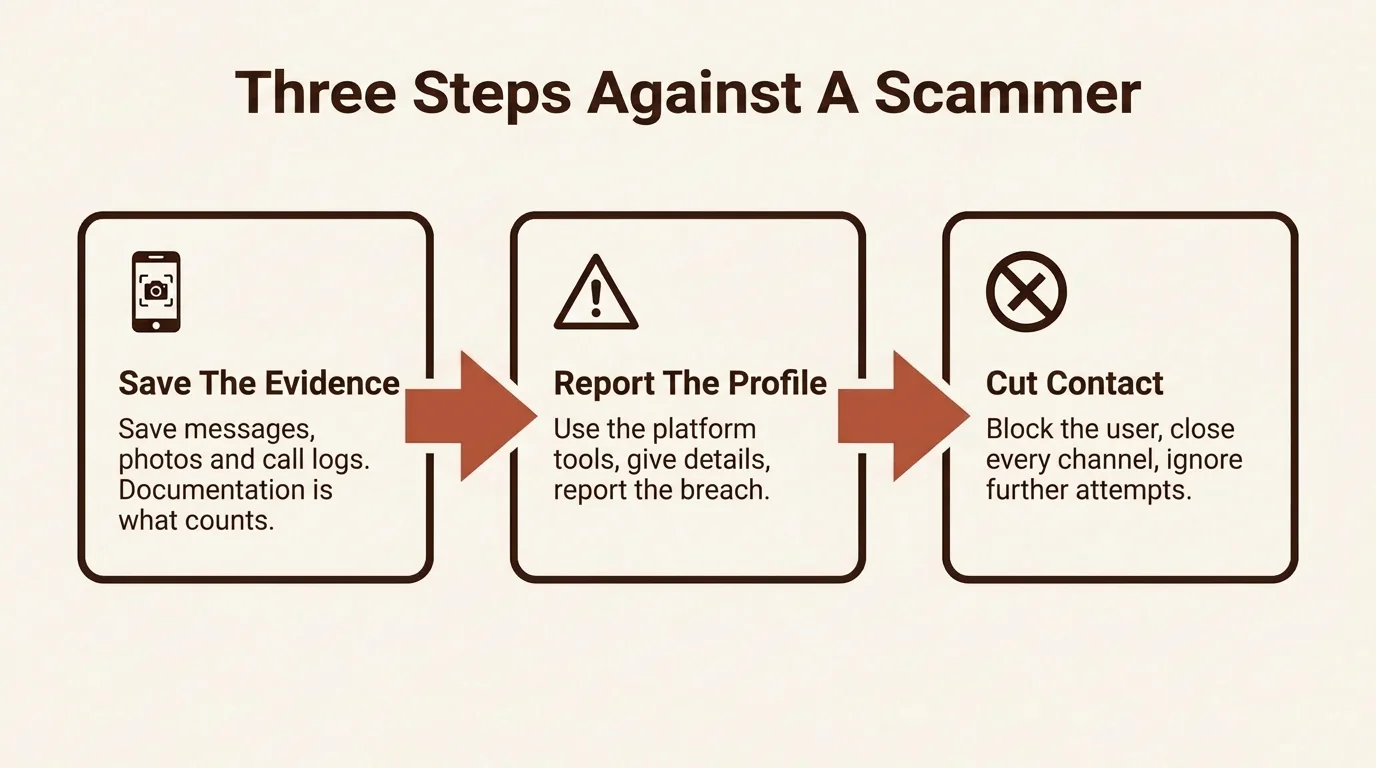
Process diagram with three steps to take after unmasking a fake profile: save evidence, report the profile, and cut off contact.

Safety comes first: as soon as you've unmasked a fake profile, you should take screenshots, report the profile to the platform, and end all communication immediately.


FAQ: Frequently asked questions about reverse image searching

Can you find out who a person is from a picture?

You can use a picture to find out if it's already been used online, but not necessarily who the person behind it really is. Tools like Google Lens, Yandex or PimEyes will show you if it's a stolen profile picture. A reverse image search reveals where else the photo appears: on stock photo sites, on other social media profiles or on websites. If the picture shows up under different names, that's a clear sign of identity theft. You won't find out the scammer's real identity this way – but you will know that the person isn't who they claim to be.

Which reverse image search app is free?

A completely free app for reverse image searching is Google Lens, which is available for iOS and Android and is a great all-rounder. Yandex and TinEye also offer free basic searches directly in your browser, which you don't even need an account for. Google Lens is often already integrated into Android devices and available as a separate app for iOS, with unlimited searches and no hidden costs or premium features.

What is the best face search engine?

The best face search engine depends on your goal, but Yandex often delivers surprisingly accurate results for facial recognition. For most profile picture searches, Google Lens is the best and easiest starting point. If you don't find any matches with it, Yandex is a good alternative, as its recognition is often more accurate, especially for images from social media. PimEyes, on the other hand, is a professional tool that only makes sense if you're willing to pay for detailed results and want to do very deep research.

How can you spot a fake Instagram profile without a search?

You can spot a fake Instagram profile without a search by looking for a combination of typical warning signs. Watch out for profiles with very few followers, only a handful of perfect photos, no stories and a vague bio. Other red flags include quick love-bombing messages and a push to move the conversation to WhatsApp immediately. Real singles also have no problem with a spontaneous video call. Additional signs include profiles that follow hundreds of accounts but have hardly any followers themselves, or a lack of comments from friends under their pictures.

Does a reverse image search work on private photos?

No, a reverse image search doesn't work on private photos, as it only searches the publicly accessible internet. So, if a picture has only been sent privately on WhatsApp and never posted on a website or a public profile, the search won't find any results. Private messages, closed groups or password-protected areas are not indexed. If a scammer uses a photo they've received from an unsuspecting victim, it won't show up anywhere either. That's why, if in doubt, you should always ask for a live photo with a note.

How do I spot AI-generated profile pictures?

You can spot AI-generated profile pictures by looking for unnatural details like asymmetrical earrings, the wrong number of fingers or skin that's too perfect and has no pores. Also, watch out for blurry or strange-looking backgrounds. The surest test is to ask for a spontaneous photo with a word of your choice on a piece of paper, which an AI can't deliver in seconds. Also, check if all the pictures have the same perfect aesthetic; real profiles show photos from different situations and with different lighting.

What should I do if the reverse image search returns no results?

If the reverse image search returns no results, it doesn't automatically mean the profile is genuine, so you should check for other warning signs. Ask yourself if the person is avoiding video calls, pushing you to move to WhatsApp, or using love-bombing tactics. Reasons for no matches could be that the photo is AI-generated, stolen from a private profile, or too new. Therefore, never rely on the image search alone and, as a next step, ask for a live photo or use a scam check tool.

Using PimEyes to search is generally legal, but you should be aware that search queries are saved and strict data protection rules apply. In the EU, you are allowed to search for your own face, for example, to detect identity theft. However, searching for other singles without their permission may violate data protection law and could be misused for stalking. Therefore, use the tool exclusively to protect yourself and not to spy on others. Always trust your gut feeling when making a decision.

🛡️ Scam check by Alva

Not sure about a contact? Upload a screenshot — Alva checks it for fraud patterns in under a minute.

Try it free →

Screenshots are never stored.

More from “Safety & scam protection